In the wild
Looks like this on your deck.
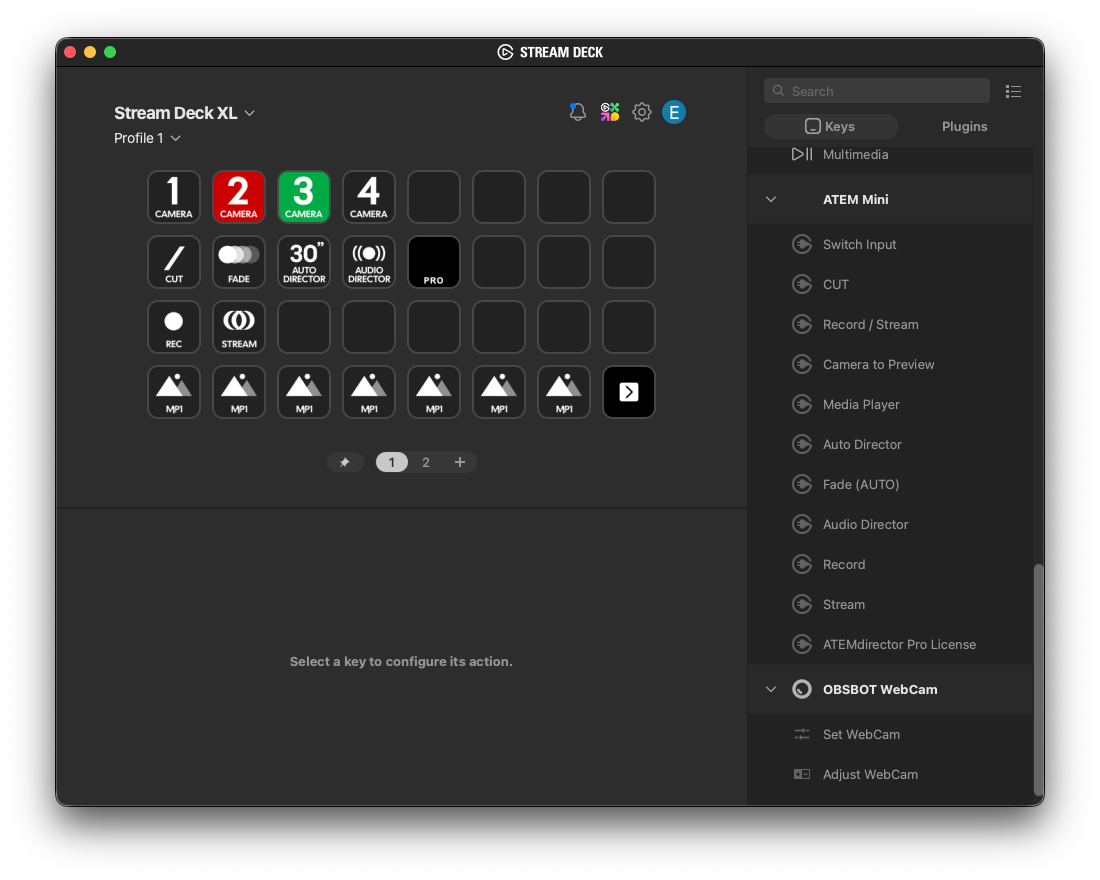
Stream Deck XL · CAM 2 live · CAM 3 in preview
Stop reaching for your mouse mid-stream. ATEMdirector puts full ATEM control on your Stream Deck — with automatic camera switching that actually works.
One-time payment. $29. macOS. Windows coming soon.
You bought an ATEM.
You bought a Stream Deck.
They don't talk to each other.
Instant CUT or configurable Mix crossfade. Set the fade duration. Hit the button. Done.
Send any camera to Preview with one press. Buttons turn green on preview, red when live. Set your ATEM IP once — every button shares it automatically.
Dedicated record and stream toggle buttons. Red when active, dark when off.
Automatic cuts on a randomized timer with per-camera dwell times. Natural, not robotic.
ProDetects who's speaking via your audio interface and cuts to the right camera automatically. Auto-installs Python dependencies on first run — no setup needed.
ProLoad stills into MP1 and send to preview in one press. Shows which still is loaded on the button.
Stream Deck XL · CAM 2 live · CAM 3 in preview
Connect your Zoom L8 (or any multi-channel audio interface) and ATEMdirector listens to each mic individually. When someone speaks, their camera goes live — automatically.
Assign up to 2 microphones per camera. Your establishing shot enters automatically every 30–60 seconds. Full hands-free directing.
"Expected" = same protocol, not yet confirmed. Let us know if you test it.
Have a feature request? Email us or open an issue on GitHub.
Latest release: v1.2.0 (May 2026)
Download ATEMdirector →Tested on ATEM Mini Pro ISO · macOS 10.15+
Want to try first? Download the free version — includes CUT, Camera to Preview, and Media Player.
Which ATEM models are supported?
Tested on ATEM Mini Pro ISO. Expected to work on ATEM Mini and Mini Pro (same protocol). ATEM Mini Extreme and G2 support is planned.
What Stream Deck do I need?
Any Stream Deck model works — MK1, MK2, XL, Mini, or +. macOS only for now. Windows support is coming.
How does Audio Director work?
You need a multi-channel audio interface (like a Zoom L8) connected to your Mac. ATEMdirector listens to individual channels and cuts to the matching camera when it detects voice activity.
Is this affiliated with Blackmagic Design?
No. ATEMdirector is an independent product not affiliated with or endorsed by Blackmagic Design.
Do I need coding knowledge to set it up?
No. Installation takes about 5 minutes. Audio Director auto-installs all required Python packages on first run. A step-by-step guide is included and email support is available if you get stuck.
What's included in the free version?
CUT transition, Camera to Preview (up to 4 cameras), Media Player control, REC and STREAM buttons, and Fade transition. Pro adds Auto Director and Audio Director.